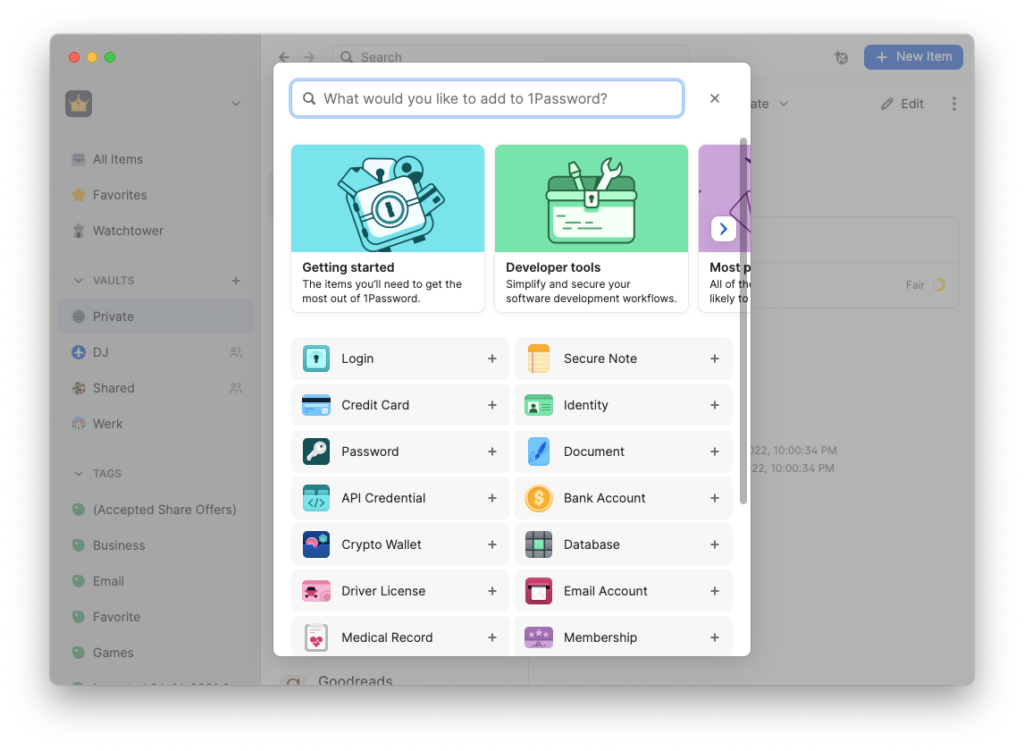
1Password is een passwordmanager voor Windows, Mac en Linux die erg fijn werkt met veel functies. Zo kan 1Password automatisch wachtwoorden typen in apps, kun je je opgeslagen accounts verdelen over kluizen, kun je kluizen delen met anderen en kan je veel andere dingen opslaan in je kluis, zoals notities, creditcardnummers, identiteitsgegevens, 2fa-sleutels, het wachtwoord van je Mac en ssh-sleutels.
Er zijn ook apps beschikbaar voor Android en iOS en natuurlijk browser-extensies voor Google Chrome, Microsoft Edge, Mozilla Firefox en andere browsers. Daarmee kun je eenvoudig automatisch gebruikersnamen en wachtwoorden invullen op websites.
Om in te loggen in 1Password maak je gebruik van een wachtwoord en een geheime sleutel. Met name die sleutel maakt je account erg veilig, omdat die erg lang en willekeurig is. Wel integreert 1Password met TouchID op Mac, FaceID op iPhone of iPad en Windows Hello op Windows 11.
Wat is er nieuw?
De ontwikkelaars van 1Password hebben versie 8.12.0 uitgebracht. Deze versie lost een aantal bugs op en verbetert vertalingen voor sommige talen. De app heeft nu op macOS Tahoe donkere en doorzichtige iconen.
Je vindt de volledige changelog van deze versie hieronder, evenals de downloadlinks en instructies hoe je kunt upgraden.
Informatie
| Versienummer | 8.12 |
| Releasestatus | Stabiel |
| Uitgebracht op | 19-01-2026 |
| Platformen | Windows, Linux, macOS |
| Ontwikkelaar | AgileBits |
| Betaald/gratis | Betaald |
Downloadlinks
Instructies
Open de 1Password-desktopapplicatie. Als er een update beschikbaar is en als die binnengehaald is, verschijnt er onderin een melding dat je de client opnieuw kunt opstarten om de update te installeren. Om zelf op updates te controleren, ga je naar Instellingen / Over en klik je op Controleren op updates.
Changelog
Windows
- We’ve Fixed an issue with an unclickable prompt when being asked to enable two-factor authentication during sign-in.
- You now only see the Windows Passkeys setup prompt if an unlocked account has the setting “Passkey item support” enabled.
- We’ve improved localization for a number of our supported languages. If you’d like to suggest a localization improvement, contact 1Password Support.
- We’ve added settings to reduce lag and choppy performance on some high refresh rate G-SYNC monitors.
- We’ve fixed intermittent connection issues between the MSIX version of 1Password for Windows and the browser extension.
- We’ve fixed an issue where
op-ssh-sign-wsl.execould fail to translate Windows Subsystem for Linux (WSL) paths to Windows paths, causing Git commit signing to fail in WSL. - We’ve fixed an issue where one-time password fields from Bitwarden login items didn’t import correctly.
- We’ve updated the account icon shown in the authentication prompt when using the CLI or SDK desktop app integrations to have rounded corners.
- We’ve fixed an issue where the step to download the 1Password extension was missing from Guided Setup for individual and family accounts.
- We’ve fixed an issue where selecting the Create vault button multiple times could cause multiple vaults to be created.
- We’ve fixed an issue where items containing files could be duplicated or moved into accounts where file storage was turned off.
- We’ve fixed an issue that prevented ADMX templates from being ingested and applied in Microsoft Intune.
Mac
- We’ve Fixed an issue with an unclickable prompt when being asked to enable two-factor authentication during sign-in.
- We’ve added Dark Mode and clear 1Password icons for macOS Tahoe.
- We’ve improved localization for a number of our supported languages. If you’d like to suggest a localization improvement, contact 1Password Support.
- We’ve fixed an issue where one-time password fields from Bitwarden login items didn’t import correctly.
- We’ve updated the account icon shown in the authentication prompt when using the CLI or SDK desktop app integrations to have rounded corners.
- We’ve fixed an issue where the step to download the 1Password extension was missing from Guided Setup for individual and family accounts.
- We’ve fixed an issue where selecting the Create vault button multiple times could cause multiple vaults to be created.
- We’ve fixed an issue where items containing files could be duplicated or moved into accounts where file storage was turned off.
Linux
- We’ve Fixed an issue with an unclickable prompt when being asked to enable two-factor authentication during sign-in.
- We’ve improved error messages and made restarting device enrollment smoother when it fails.
- The Linux import callouts now point to the correct support article.
- We’ve improved localization for a number of our supported languages. If you’d like to suggest a localization improvement, contact 1Password Support.
- We’ve fixed an issue where one-time password fields from Bitwarden login items didn’t import correctly.
- We’ve updated the account icon shown in the authentication prompt when using the CLI or SDK desktop app integrations to have rounded corners.
- We’ve fixed an issue where the step to download the 1Password extension was missing from Guided Setup for individual and family accounts.
- We’ve fixed an issue where selecting the Create vault button multiple times could cause multiple vaults to be created.
- We’ve fixed an issue where items containing files could be duplicated or moved into accounts where file storage was turned off.
- Pressing the Alt key now focuses the 1Password menu icon instead of showing the legacy menu bar.